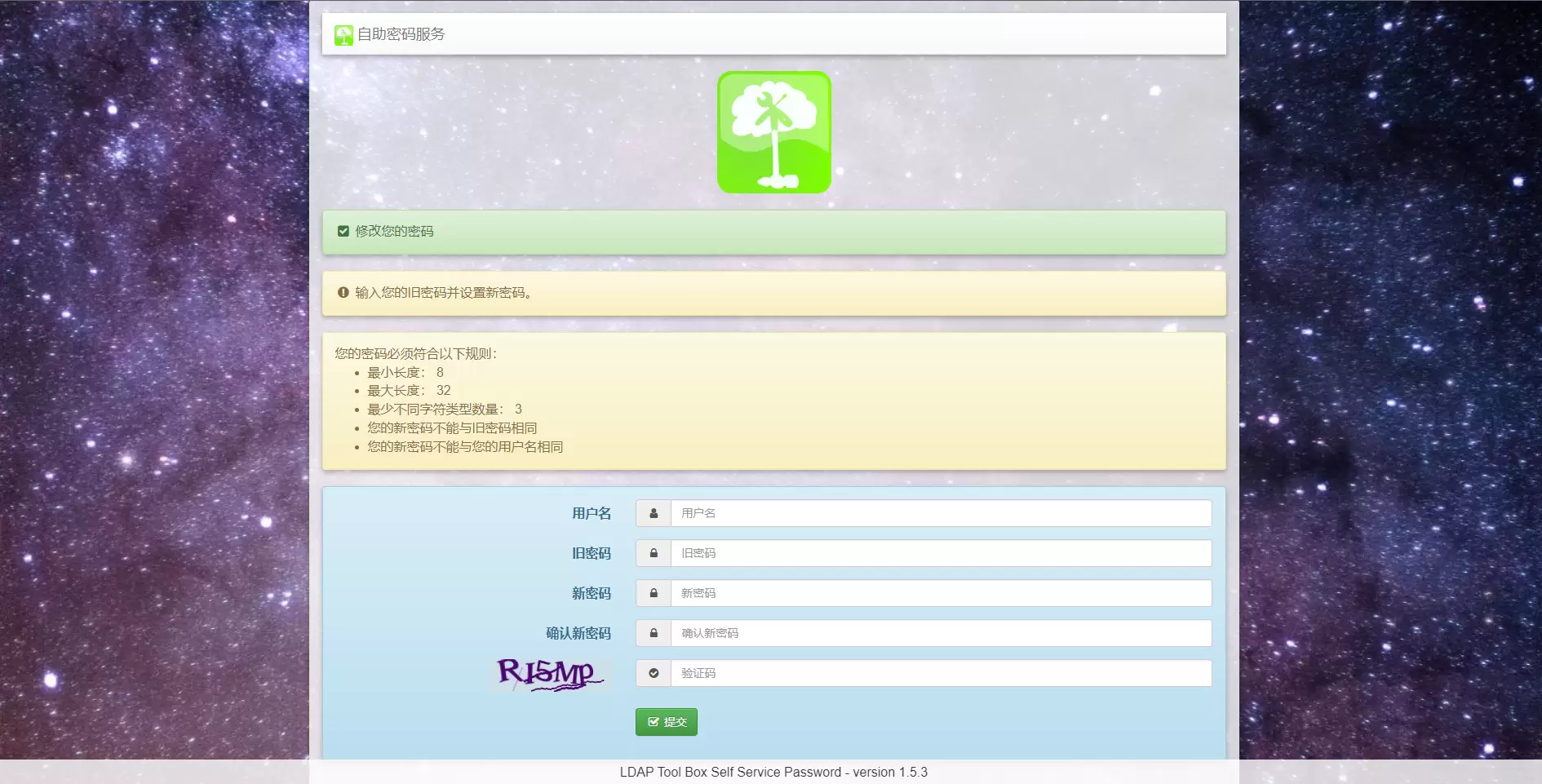
The purpose of installing self-service-password is to solve the pain point of manually changing passwords for LDAP or Windows AD administrators. Generally, LDAP deployed by enterprises has a password expiration policy, which requires users to change their passwords themselves within a specified period of time to update the password usage cycle.
1、Installation of self-service-password dependencies
1.1 There is a description here of what is required to rely on the
- Apache or another web server (Here it is with Nginx)
- php (>=7.4) (Here it is with PHP 8.0)
- php-curl (haveibeenpwned api)
- php-filter
- php-gd (captcha)
- php-ldap
- php-mbstring (reset mail) (This requires the epel source to be installed in order for yum to work.)
- php-openssl (token crypt, probably built-in)
- Smarty (version >=3) (Note the version for this installation, after modifying the default php library file paths)
⚠️ 注意 The following compilation and installation default is already installed gcc or gcc-c++ compilation, not installed according to their own needs to install, as well as in the compilation and installation of PHP is missing the appropriate library files, you need to install the appropriate installation package according to the situation.
1.2 Compile and install openssl Download the latest version of openssl at openssl official website.
tar -xvf openssl-1.1.1v.tar.gz -C /usr/local/src/cd /usr/local/src/openssl-1.1.1v./config --prefix=/opt/opensslmake && make install1.3 Compile and install openldap I have the TLS version installed on my side
tar -xvf openldap-2.5.16.tar.gz -C /usr/local/src/cd /usr/local/src/openldap-2.5.16export PKG_CONFIG_PATH=/opt/openssl/lib/pkgconfigenv CPPFLAGS="-I/opt/openssl/include" LDFLAGS="-L/opt/openssl/lib -D_GNU_SOURCE" ./configure --prefix=/opt/openldapmake && make install1.4 Compile and Install Nginx
tar -xvf nginx-1.24.0.tar.gz -C /usr/local/src/cd /usr/local/src/nginx-1.24.0./configure \--prefix=/usr/local/nginx \--with-http_realip_module \--with-http_sub_module \--with-http_gzip_static_module \--with-http_stub_status_module \--with-http_ssl_module \--with-http_v2_module \--with-openssl=/usr/local/src/openssl-1.1.1v \--with-pcre=/usr/local/src/pcre-8.45 \--with-zlib=/usr/local/src/zlib-1.2.12
make && make install1.5 Compile and install php
tar -xvf php-8.0.30.tar.gz -C /usr/local/src/cd /usr/local/src/php-8.0.30./configure \--prefix=/usr/local/php8 \--exec-prefix=/usr/local/php8 \--bindir=/usr/local/php8/bin \--sbindir=/usr/local/php8/sbin \--includedir=/usr/local/php8/include \--libdir=/usr/local/php8/lib/php \--mandir=/usr/local/php8/php/man \--with-config-file-path=/usr/local/php8/etc \--enable-fpm \--enable-fastcgi \--with-curl \--enable-filter \--enable-gd \--with-ldap=/opt/openldap \--enable-mbstring \--with-openssl=/opt/openssl
make && make install1.5.1 Compile and install php extension gd.so module After compiling php according to the above, there is no gd.so module by default, due to the use of self-service-password image verification code function, this module must have First install the image dependency packages
tar -xvf libpng-1.6.40.tar.gz -C /usr/local/src/tar -xvf jpegsrc.v9e.tar.gz -C /usr/local/src/tar -xvf freetype-2.13.1.tar.gz -C /usr/local/src/
cd /usr/local/src/libpng-1.6.40./configure --prefix=/opt/libpngmake && make install
cd /usr/local/src/jpegsrc.v9e./configure --prefix=/opt/jpegmake && make install
cd /usr/local/src/freetype-2.13.1./configure --prefix=/opt/freetypemake && make installCompile the php extension gd again
yum install autoconfcd /usr/local/src/php-8.0.30/ext/gd/usr/local/php/bin/phpize./configure \--with-php-config=/usr/local/php8/bin/php-config \--with-libdir=/opt/libpng/lib \--with-freetype=/opt/freetype/lib \--with-jpeg=/opt/jpeg/lib
make && make installAt this point something like /usr/local/php8/lib/php/extensions/no-debug-non-zts-20200930 directory with gd.so module
2、Editing Service Configuration Files
2.1 php services Compiling php.ini
###### Avoid exposing PHP information in http headersexpose_php = Off
###### Avoid exposing php calls to mysql error messagesdisplay_errors = Off
###### Turn on PHP error logging with display_errors turned off (path configured in php-fpm.conf)log_errors = On
###### Setting the path to PHP's extension librariesextension_dir = "/usr/local/php8/lib/php/extensions/no-debug-non-zts-20200930/"
###### Setting up PHP opcache and mysql dynamic librarieszend_extension=opcache.soextension=gd.so
###### Setting the PHP time zonedate.timezone = PRC
###### Enable opcache[opcache]; Determines if Zend OPCache is enabledopcache.enable=1
###### Set the directories that PHP scripts are allowed to access (needs to be configured accordingly);open_basedir = /usr/local/nginx/www;Compiling php-fpm.conf
error_log = /var/log/php-fpm/error.log###### Introducing configuration in the www.conf fileinclude=/usr/local/php8/etc/php-fpm.d/*.confEdit www.conf
###### Setting up users and user groupsuser = nginxgroup = nginx
###### According to the configuration fastcgi_pass unix:/var/run/php-fpm/php-fpm.sock in nginx.conf; set up PHP listening; listen = 127.0.0.1:9000 ##### Not recommendedlisten = /var/run/php-fpm/php-fpm.sock
###### Enable slow loggingslowlog = /var/log/php-fpm/$pool-slow.logrequest_slowlog_timeout = 10s
###### Setting up the session directory for php (users and usergroups belonging to it are nginx)php_value[session.save_handler] = filesphp_value[session.save_path] = /var/lib/php/session2.2 Nginx Services Editing nginx.conf
user nginx nginx;
worker_processes auto;
...omission...
events { use epoll; worker_connections 65535;}
http { include mime.types; default_type application/octet-stream; server_tokens off;
...omission...
server { listen 80; server_name localhost;
root www/self/htdocs; index index.php index.html index.htm;
location ~* \.php$ { fastcgi_pass unix:/var/run/php-fpm/php-fpm.sock; fastcgi_split_path_info ^(.+\.php)(/.+)$; fastcgi_param PATH_INFO $fastcgi_path_info; fastcgi_param PATH_TRANSLATED /usr/local/nginx/www/self/htdocs$fastcgi_path_info; fastcgi_param SCRIPT_FILENAME /usr/local/nginx/www/self/htdocs$fastcgi_script_name; fastcgi_index index.php; try_files $fastcgi_script_name =404; fastcgi_read_timeout 600; include fastcgi_params; }
...omission...
}
}⚠️ 注意 Since I am using nginx user with /sbin/nologin attribute, defining the web project directory permissions as nginx:nginx, accessing the page via GET prompts 403, and I can only put the web project directory under the nginx installation directory, and then accessing the page via GET again is normal.
2.3 Configuring the self-service-password service Smarty library
At this time self-service-password php service can not yet be accessed normally, because its default Smarty library files are pointing to the /usr/share/ directory, the service can not be found, and you have to download the latest version of this page is labeled > corresponds to the Version use the specified php version, to download then point here
tar -xvf smarty-4.3.2.tar.gzcd smarty-4.3.2mv libs /usr/local/nginx/www/self/smartyEdit /usr/local/nginx/www/self/conf/config.inc.php
### Change around 410 linesif (!defined("SMARTY")) { define("SMARTY", "/usr/share/self/smarty/Smarty.class.php");}
modify to
if (!defined("SMARTY")) { define("SMARTY", "/usr/local/nginx/www/self/smarty/Smarty.class.php");}
Eliminate comments around lines 397-398$smarty_compile_dir = "/usr/local/nginx/www/self/templates_c";$smarty_cache_dir = "/usr/local/nginx/www/self/cache";
Change the path to the path you set3、Configuring the self-service-password service
Edit /usr/local/nginx/www/self/conf/config.inc.php
$keyphrase # This parameter is followed by a random string of random characters, otherwise the page will not display correctly$use_questions = false; # Close issue retrieval$use_sms = false; # Disable SMS retrievaluse_tokens = false; # Disable Email retrieval
# I don't use any of these features, so I turned them all off, but if you need them, turn them on and configure them accordingly.
$use_captcha = true; # Enable Image Captcha$pwd_min_length = 8; # Minimum password length$pwd_max_length = 32; # Maximum password length$pwd_complexity = 3; # Passwords contain several character types$pwd_show_policy = "always"; # Page Display Password Policy
The last is the LDAP-related configuration, according to the parameters corresponding to fill in on it.4、The final picture of the finished product