Preface
Nowadays, the use of VPN is a very common way of working in enterprises. Some internal knowledge bases, file services, code management, OA systems, financial systems and other information systems are only accessible to the enterprise LAN, and these services will not be exposed on the public Internet, increasing the risk of enterprise information security. If employees of enterprises need to access the internal information system when they are on business trips or working from home, then VPN is very important. Even if they are not in the company, as long as there is Internet, they can be authenticated through the VPN network and then connected to the enterprise intranet service.
OpenVPN App
For this kind of enterprise VPN deployment tutorial, most of the solutions we see are OpenVPN, as shown in the figure below:
 This deployment method is more suitable for the needs of small enterprises. For medium-sized or larger enterprises, the experience will be very poor if deployed in this way. This is not in terms of performance, but in terms of auditing!
OpenVPN is designed with anonymity as the main purpose. For all users connected to the OpenVPN Server, only the server-side log records the login account, time, user public IP, assigned virtual IP, login status and other field information. However, the problem is that the request IP displayed when users access the enterprise intranet service is the OpenVPN Server IP, not the virtual IP address assigned by the OpenVPN Server, so it is difficult to trace who has violated the rules.
Imagine if there are 500 or more VPN terminals connected concurrently. Once someone forgets the login password of some internal information system and tries to log in there, causing the IP to be locked, then no one else can access it normally because the request IP is the same. Some people even try to penetrate the intranet horizontally with their computers, which leads to being captured and processed by the security department’s situational awareness. However, you cannot find out which user is performing this operation, but you need to handle it in time and complete the security incident closed loop as soon as possible. What should you do? Directly make ACL policies to restrict the OpenVPN Server IP from continuing to access? A lot of people are connected to VPN for work. If you just block the IP traffic, then no one can access the internal network of the enterprise normally, and a large number of complaints will follow!
Therefore, the following applies to device VPN access to solve audit problems
Using firewall device VPN function
Preliminary preparation
| Name | IP | Mask | Description |
|---|---|---|---|
| Primary LDAP | 10.100.10.1 | 24 | Primary LDAP Server Service |
| Secondary LDAP | 10.100.10.2 | 24 | Secondary LDAP Server Service |
| Firewall devices | 10.88.15.254 | 24 | Firewall interface IP |
| VPN address pool | 10.90.10.x | 24 | VPN address allocation pool |
The VPN accounts here are all integrated accounts. You don’t need to consider creating local VPN accounts when employees join the company, or deleting local accounts when employees leave the company. It’s easy to do with a small number of people, but it’s very annoying when there are too many people! Therefore, the creation and deactivation of personnel accounts can be automatically handled by the process management system on the HR side. The management services used by these integrated accounts, whether deployed by OpenLDAP Server or Active Directory, can be connected to VPN account access.
 The advantage of this method is that there is no OpenVPN Server service, and an independent VPN segment is allocated to the LAN. After the user logs in to the VPN, the allocated VPN address is independent, and the request IP to access the intranet information system is the VPN client IP. Regardless of whether the IP is trying to crack the service password or doing any illegal operations, directly blacklisting the specified VPN client IP will not affect other users, and even ACL policies can be configured as required.
⚠️ 注意 Firewall VPN access has a limit on the number of concurrent users. If the number of concurrent users of an enterprise VPN is hundreds or even thousands, it is best to use a dedicated VPN device with a full range of functions.
Configuring SSL VPN Access on Firewall Devices
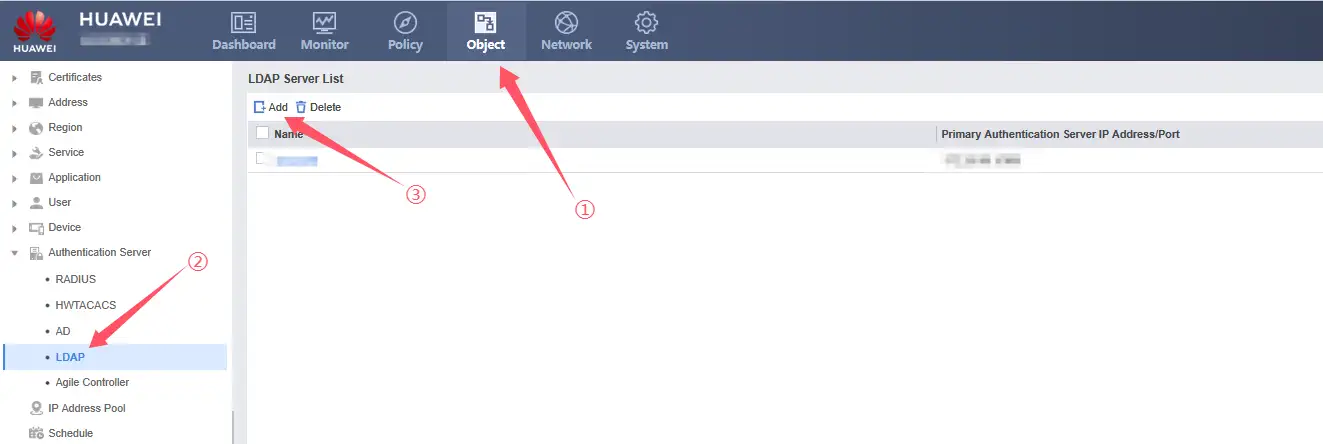
1、How to add authentication service to the firewall
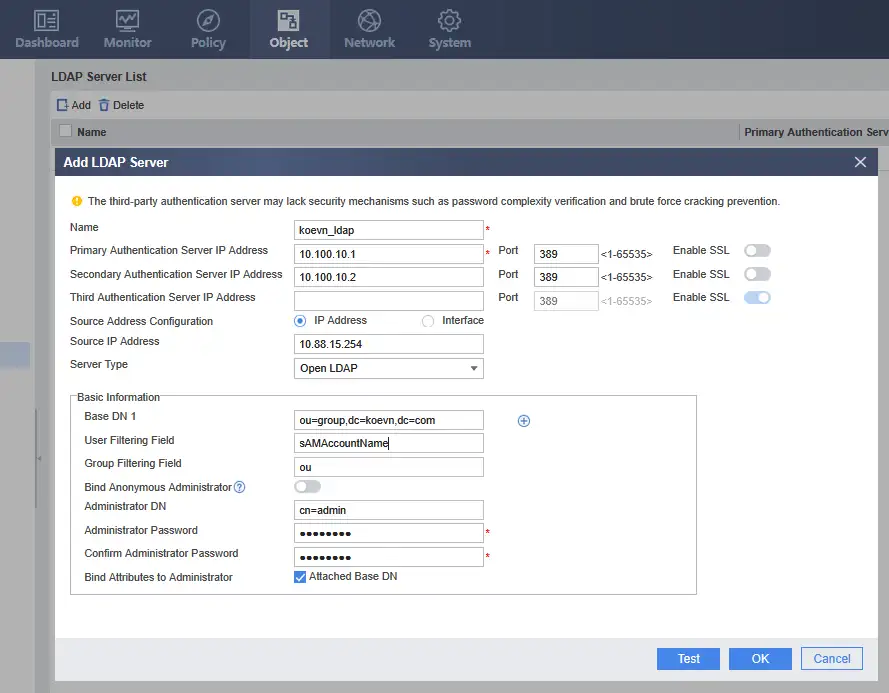
2、Add LDAP Server configuration information
The
User Filtering Fieldin the figure is configured accordingly according to different uses. For example, some companies may use the pinyin of the name as the integrated account, while some companies use the employee number as the integrated account. Because many Chinese characters have the same pronunciation as pinyin, numbers such as 001 will be added after the same pinyin to distinguish them. The employee number is continuously increased, and the same employee number will not appear.
3、Add VPN authentication domain
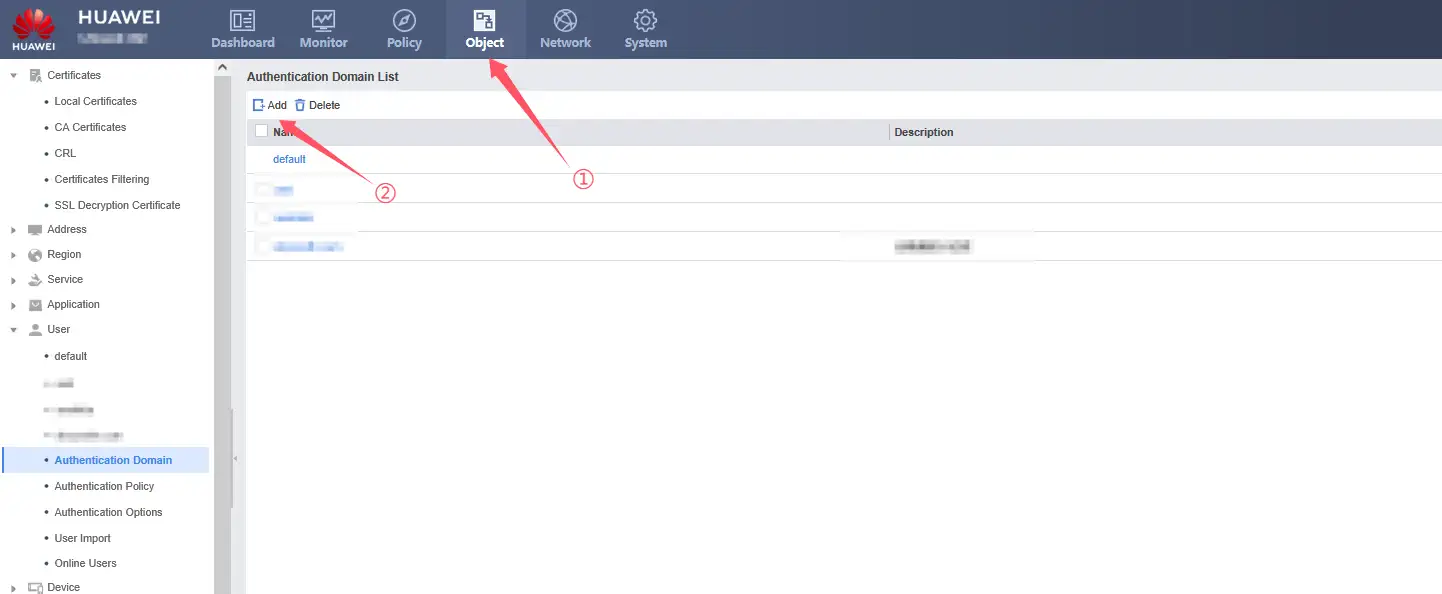
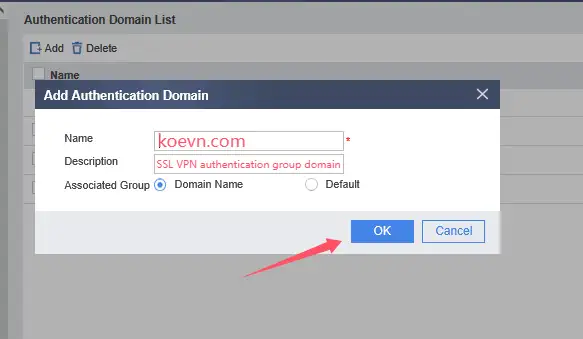
The name of the authentication domain should correspond to the
dc=koevn,dc=comafter the Base DN in the LDAP Server configuration
4、Configuring VPN Authentication Domain Access Type and User Import Policy
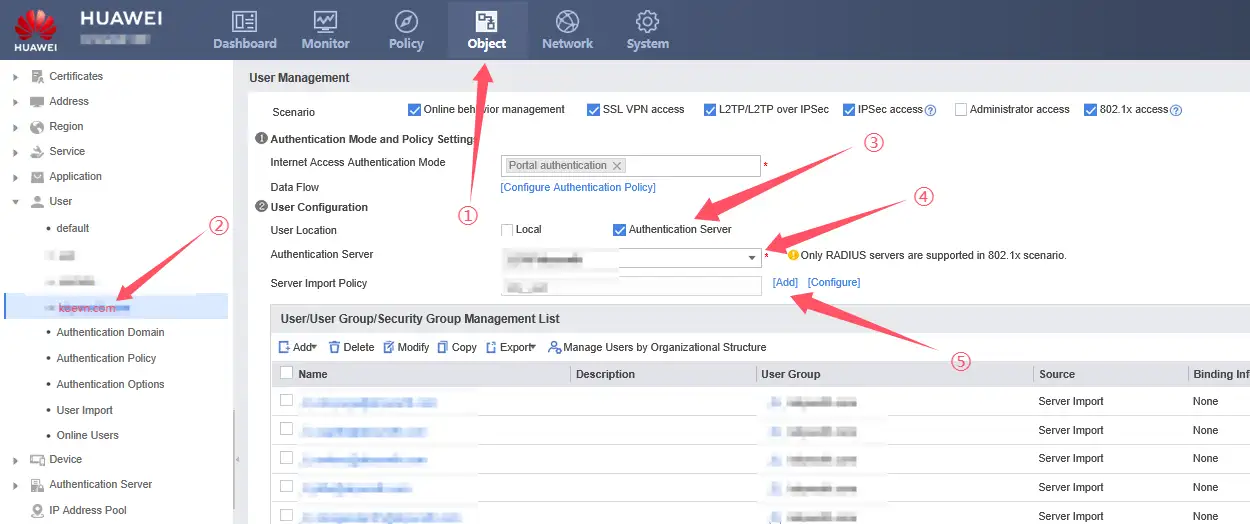
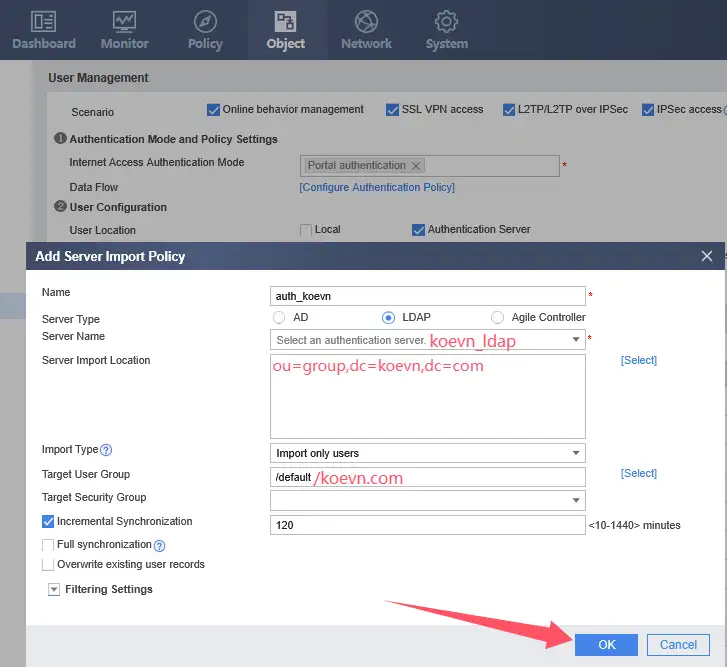
- Server Name: Added LDAP Server configuration authentication name
- Import Type: Select Import User as the import type.
- Target User Group: This is the authentication domain created, and its name is /koecn.com
5、Configuring SSL VPN
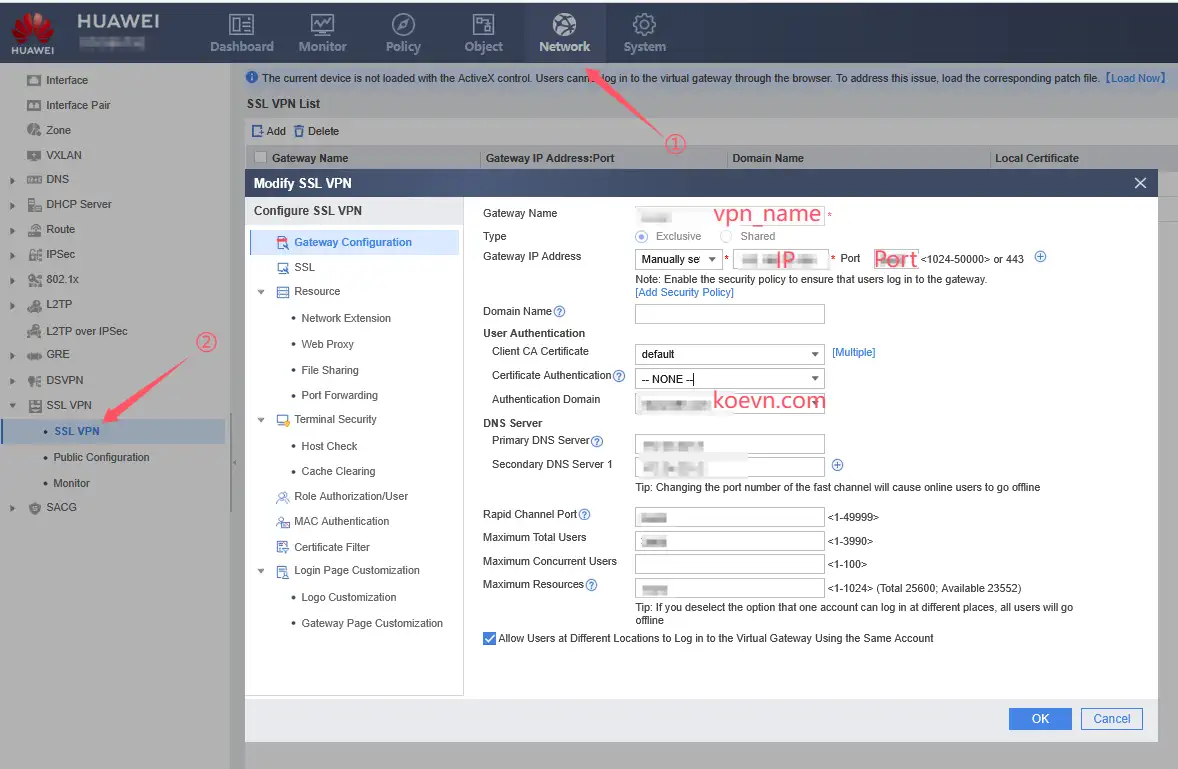
Gateway IP Address configures the address. If there is a public IP, just write the public IP directly. If there are two or more firewalls as load balancing and they are the primary and backup of each other, you can configure the domain name to achieve VPN access load balancing.
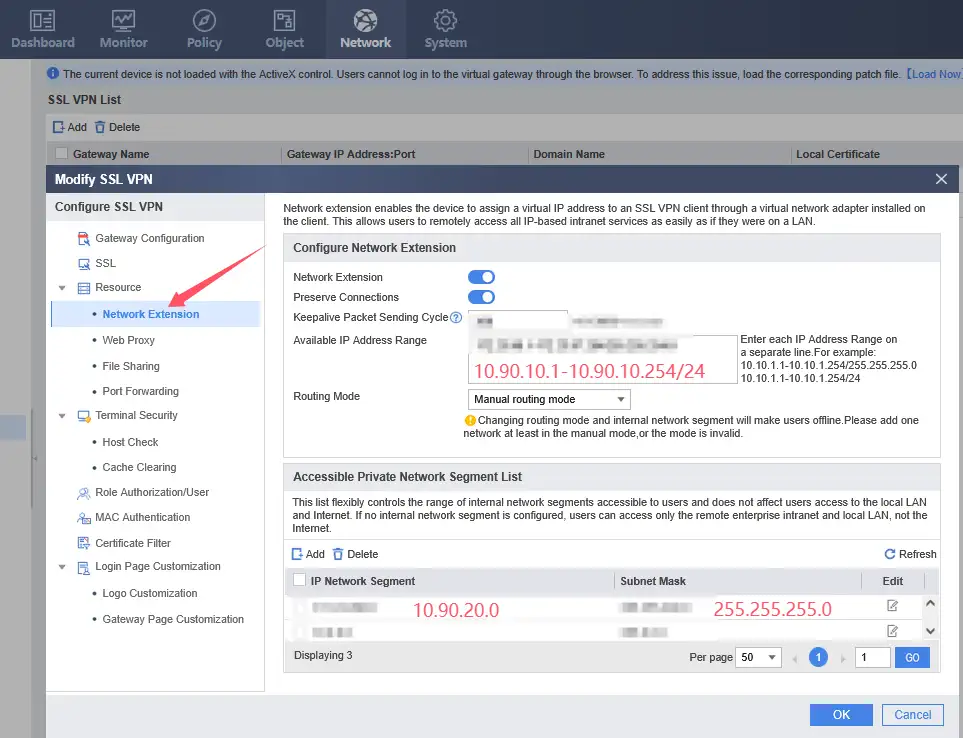
In the “Network Extension” item, the “IP Network Segment” item below must include the network segment you need to access. Otherwise, even if the VPN is connected, you will not be able to access the corporate intranet services.
6、Adding a VPN Access Security Policy
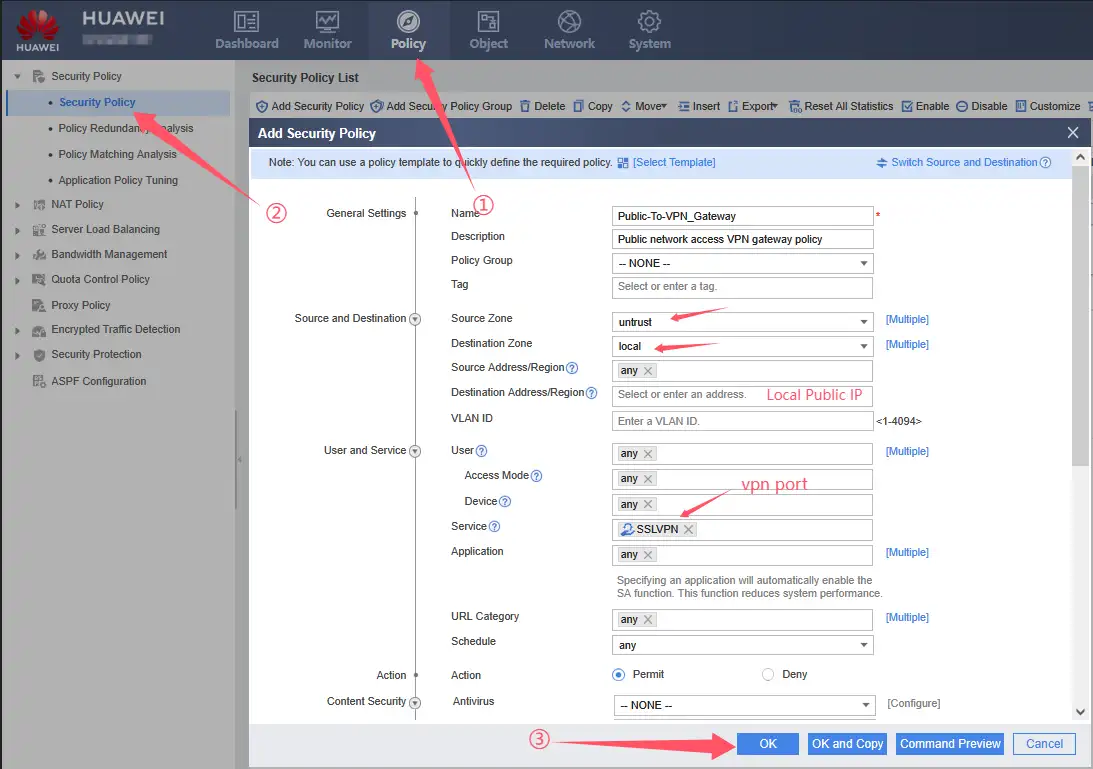
- Local Public IP: The public IP address of the firewall WAN port
- vpn port: custom DTCP port number
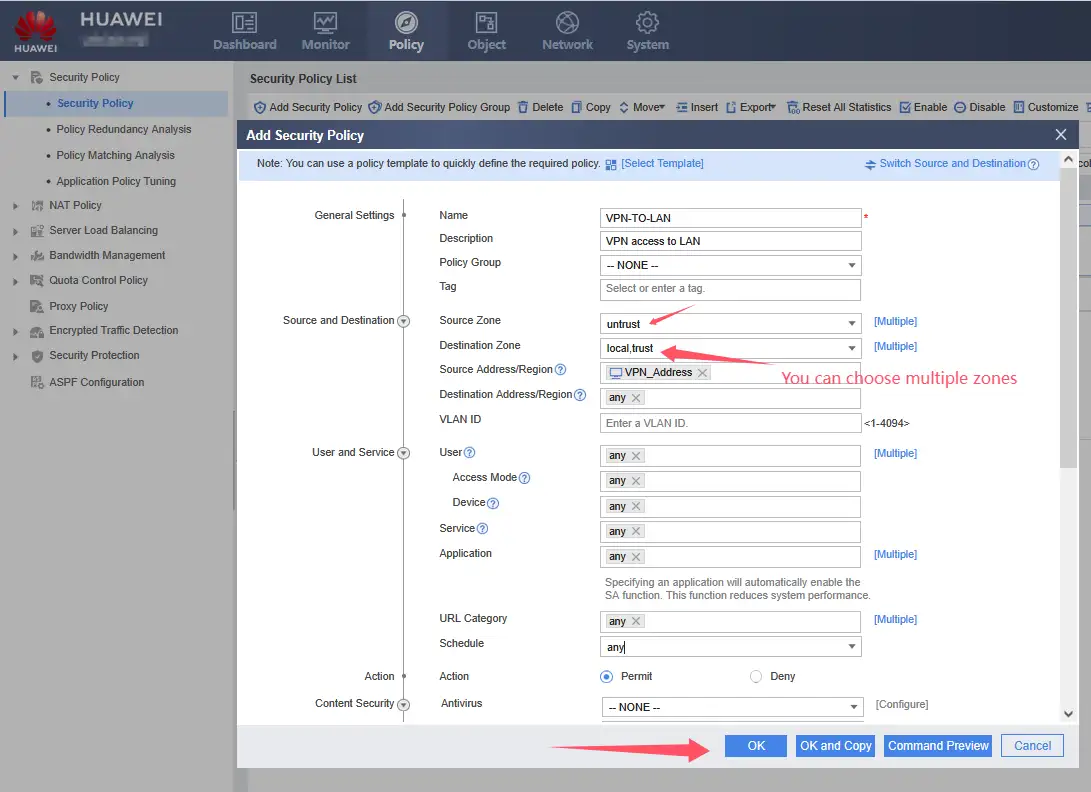
VPN Address: Customized address segment name. In this name setting, you can add different VPN segments.
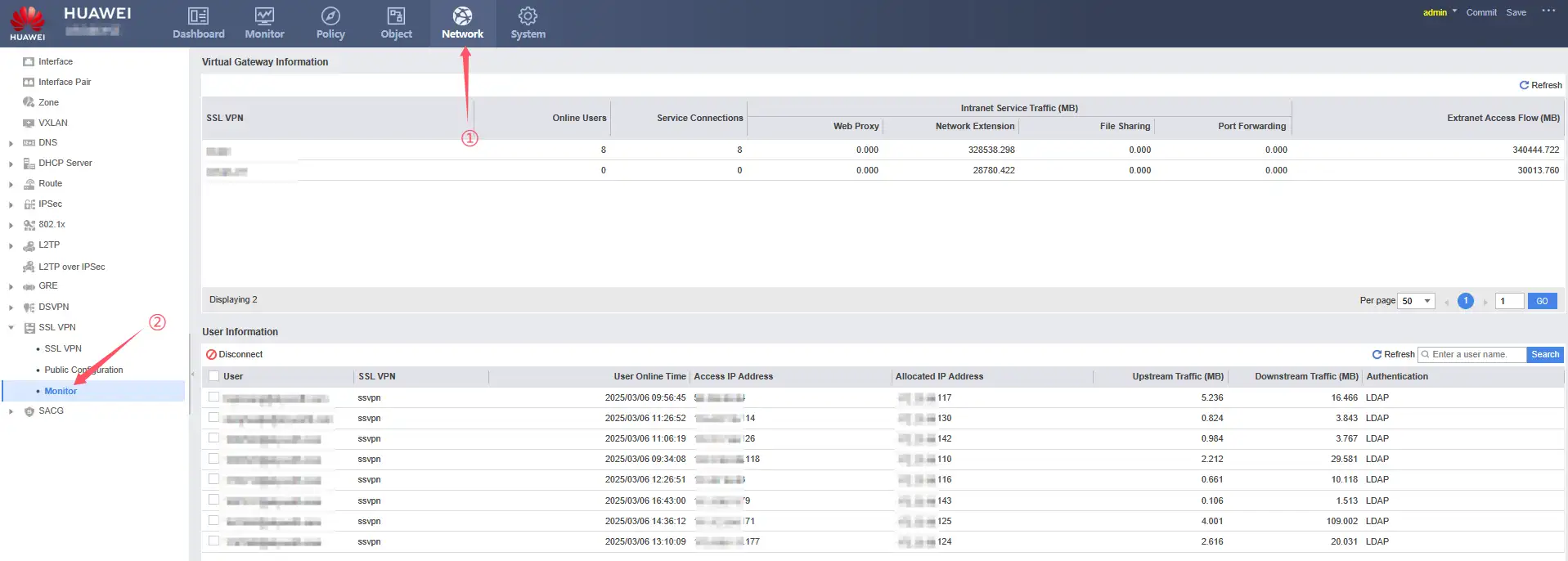
7、Last VPN connection status