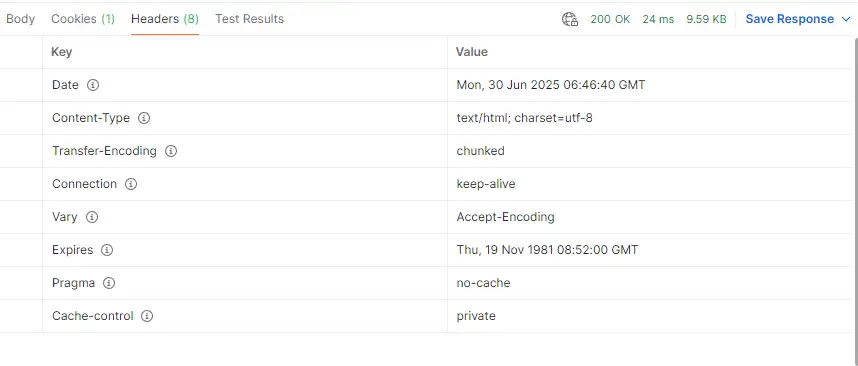
Business systems are often subject to regular penetration testing and provide external Web services. Version information is often leaked, resulting in security vulnerabilities in outdated versions, so some basic security reinforcement is required.
The prerequisite for compiling and installing Ningx is to install the GCC compilation environment
1 Install the compilation environment
koevn@localhost:~$ sudo apt updatekoevn@localhost:~$ sudo apt install gcc g++ make wget # Install the compilation environmentkoevn@localhost:~$ sudo wget https://nginx.org/download/nginx-1.20.2.tar.gzkoevn@localhost:~$ tar -xvf nginx-1.20.2.tar.gzkoevn@localhost:~$ cd nginx-1.20.22 Modify the Nginx source package
2.1.0 Modify the ngx_http_header_filter_module.c file
vim src/http/ngx_http_header_filter_module.c
Modify the file around line 49
static u_char ngx_http_server_string[] = "Server: nginx" CRLF;
Change to
static u_char ngx_http_server_string[] = "Server: " CRLF;
2.2.0 Modify the ngx_http_special_response.c file
vim src/http/ngx_http_special_response.c
Modify the file around line 36
"<hr><center>nginx</center>" CRLF
Change to
"<hr><center></center>" CRLF
2.3.0 Modify the nginx.h file
vim src/core/nginx.h
Modify lines 13 and 14 of the file
#define NGINX_VERSION "1.28.0"
#define NGINX_VER "nginx/" NGINX_VERSION
Change to
#define NGINX_VERSION ""
#define NGINX_VER "/" NGINX_VERSION
3 Add headers-more-nginx module
This is a third-party module, which is used to remove the Server field in the Response Headers. The second step above only hides the Nginx information, but the Server field value is displayed as empty. It still looks a bit strange, so just remove the field directly.
koevn@localhost:~$ sudo wget https://github.com/openresty/headers-more-nginx-module/archive/refs/tags/v0.38.tar.gz \ -O headers-more-nginx-module.tar.gzkoevn@localhost:~$ sudo tar -xvf headers-more-nginx-module.tar.gzWhen compiling and installing Nginx, just add the --add-module=../headers-more-nginx-module parameter.
4 Edit Nginx Configuration File
Edit the nginx.conf configuration file
http {
#------ Other configurations omitted ------#
more_clear_headers Server; # Just add this paragraph
#------ Other configurations omitted ------#
}Edit the host configuration file conf.d/site.conf
server {
#------ Other configurations omitted ------#
proxy_hide_header X-Powered-By; # Just add this paragraph
#------ Other configurations omitted ------#
}5 Test Results