
場合によっては、サーバー環境の都合上、本番環境でもテスト環境でも、インターネットへのアクセスが禁止されることがあります。しかし、この画一的なアプローチは、特に開発者がテスト環境サーバーに依存ライブラリをインストールします。依存環境を手動でインストールするのに時間を費やすことはできないため、プロキシ サーバーを使用して LAN サーバーでこれらのタスクを完了する方が、各マシンに ISO イメージをマウントするよりもはるかに便利です。
全体的なアーキテクチャは次のようになります
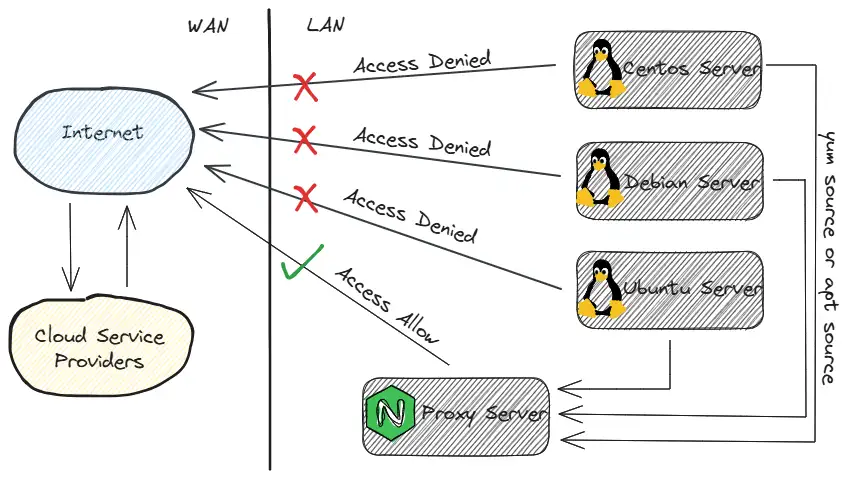 通常は、ハードウェア ファイアウォールで
 Internet ネットワーク ポリシーへのアクセスを禁止するようにサーバー ネットワーク セグメントを構成してから、Nginx サーバーに server{} セグメント構成を追加します。
LAN DNSサーバーがある場合は、解決レコードを追加することをお勧めします。そうでない場合、yumソースまたはaptソースがLAN IPアドレスを使用する場合、IPアドレスが変更されると、すべての構成を再配布して更新する必要がある可能性があります。将来変更される可能性があり、非常に面倒です。
nginx.confファイルを編集する
server { listen 443; server_name mirrors.koevn.com; # 例
# その他の構成は省略
location /ubuntu/ { proxy_pass http://mirrors.aliyun.com/ubuntu/; }
location /centos/ { proxy_pass http://mirrors.aliyun.com/centos/; }
location /debian/ { proxy_pass http://mirrors.aliyun.com/debian/; }
location /epel/ { proxy_pass http://mirrors.aliyun.com/epel/; }
# その他の構成は省略
}上記の設定が完了したら、設定構文が正しいかどうかを確認し、Nginx サービスを再ロードします。LAN yum ソースまたは apt ソース プロキシ サービスが完了しました。
次に、Centos 7 オペレーティング システムを例に説明します。他のディストリビューション オペレーティング システムでは、若干の変更が可能です。
まず /etc の下にある yum リポジトリファイルをバックアップし、それを削除します。
mkdir -pv /opt/repo_bakmv /etc/yum.repos.d/*.repo /opt/repo_bak/touch CentOS-Base.repo && touch epel.repoCentOS-Base.repoファイルを編集する
# CentOS-Base.repo## The mirror system uses the connecting IP address of the client and the# update status of each mirror to pick mirrors that are updated to and# geographically close to the client. You should use this for CentOS updates# unless you are manually picking other mirrors.## If the mirrorlist= does not work for you, as a fall back you can try the# remarked out baseurl= line instead.##
[base]name=CentOS-$releasever - Base - aliyun.combaseurl=http://mirrors.koevn.com/centos/$releasever/os/$basearch/gpgcheck=1gpgkey=http://mirrors.koevn.com/centos/RPM-GPG-KEY-CentOS-7
#released updates[updates]name=CentOS-$releasever - Updates - aliyun.combaseurl=http://mirrors.koevn.com/centos/$releasever/updates/$basearch/gpgcheck=1gpgkey=http://mirrors.koevn.com/centos/RPM-GPG-KEY-CentOS-7
#additional packages that may be useful[extras]name=CentOS-$releasever - Extras - aliyun.combaseurl=http://mirrors.koevn.com/centos/$releasever/extras/$basearch/gpgcheck=1gpgkey=http://mirrors.koevn.com/centos/RPM-GPG-KEY-CentOS-7
#additional packages that extend functionality of existing packages[centosplus]name=CentOS-$releasever - Plus - aliyun.combaseurl=http://mirrors.koevn.com/centos/$releasever/centosplus/$basearch/gpgcheck=1enabled=0gpgkey=http://mirrors.koevn.com/centos/RPM-GPG-KEY-CentOS-7epel.repoファイルを編集する
[epel]name=Extra Packages for Enterprise Linux 7 - $basearchbaseurl=http://mirrors.koevn.com/epel/7/$basearchfailovermethod=priorityenabled=1gpgcheck=1gpgkey=file:///etc/pki/rpm-gpg/RPM-GPG-KEY-EPEL-7
[epel-debuginfo]name=Extra Packages for Enterprise Linux 7 - $basearch - Debugbaseurl=http://mirrors.koevn.com/epel/7/$basearch/debugfailovermethod=priorityenabled=0gpgkey=file:///etc/pki/rpm-gpg/RPM-GPG-KEY-EPEL-7gpgcheck=1
[epel-source]name=Extra Packages for Enterprise Linux 7 - $basearch - Sourcebaseurl=http://mirrors.koevn.com/epel/7/SRPMSfailovermethod=priorityenabled=0gpgkey=file:///etc/pki/rpm-gpg/RPM-GPG-KEY-EPEL-7次にyumキャッシュをクリアし、新しいキャッシュを再生成します
yum clean all && yum makecache最後に、ローカル エリア ネットワーク内で、オープンな「インターネット」ネットワーク権限を持たないサーバーでも、yum を介してソフトウェア依存環境を正常にインストールできるようになります。