
有时为了方便服务器环境,不管是生产还是测试环境,都禁止访问Internet网络,但这种一刀切的方法,有时对安装环境带来有些不变,特别是开发人员要在测试环境服务器安装依赖库,你总不能花时间手动安装依赖环境,所以利用一台代理服务器,去替局域网服务器完成这些工作,总比在各个机器上挂载ISO镜像要便捷的多。
总体架构如下
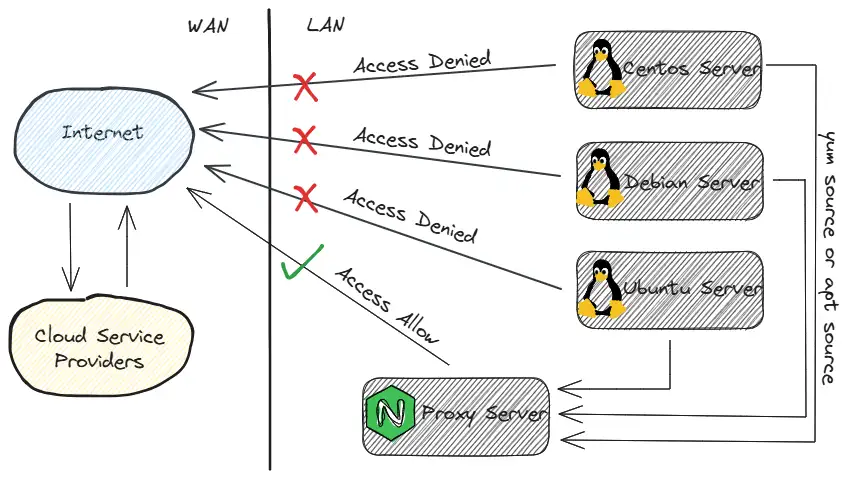
一般在硬件防火墙测配置好服务器网段禁止访问Internet网络策略,然后在Nginx Server上添加server{}段配置。
建议有局域网DNS服务器的最好添加一条解析记录,不然yum源或者apt源使用局域网IP地址,以后搞不好换IP地址所有配>置又要重新分发并更新配置,很麻烦。
编辑nginx.conf文件
server { listen 443; server_name mirrors.koevn.com; # 例子
# 其他配置省略
location /ubuntu/ { proxy_pass http://mirrors.aliyun.com/ubuntu/; }
location /centos/ { proxy_pass http://mirrors.aliyun.com/centos/; }
location /debian/ { proxy_pass http://mirrors.aliyun.com/debian/; }
location /epel/ { proxy_pass http://mirrors.aliyun.com/epel/; }
# 其他配置省略
}以上配置完成后,验证配置语法是否错误,然后重载Nginx服务,那么局域网yum源或者apt源代理服务已经完成。
接下来以Centos 7操作系统为例,其他发行版操作系统则稍作修改就行。
首先备份/etc下的yum repo文件再删除
mkdir -pv /opt/repo_bakmv /etc/yum.repos.d/*.repo /opt/repo_bak/touch CentOS-Base.repo && touch epel.repo编辑CentOS-Base.repo文件
# CentOS-Base.repo## The mirror system uses the connecting IP address of the client and the# update status of each mirror to pick mirrors that are updated to and# geographically close to the client. You should use this for CentOS updates# unless you are manually picking other mirrors.## If the mirrorlist= does not work for you, as a fall back you can try the# remarked out baseurl= line instead.##
[base]name=CentOS-$releasever - Base - aliyun.combaseurl=http://mirrors.koevn.com/centos/$releasever/os/$basearch/gpgcheck=1gpgkey=http://mirrors.koevn.com/centos/RPM-GPG-KEY-CentOS-7
#released updates[updates]name=CentOS-$releasever - Updates - aliyun.combaseurl=http://mirrors.koevn.com/centos/$releasever/updates/$basearch/gpgcheck=1gpgkey=http://mirrors.koevn.com/centos/RPM-GPG-KEY-CentOS-7
#additional packages that may be useful[extras]name=CentOS-$releasever - Extras - aliyun.combaseurl=http://mirrors.koevn.com/centos/$releasever/extras/$basearch/gpgcheck=1gpgkey=http://mirrors.koevn.com/centos/RPM-GPG-KEY-CentOS-7
#additional packages that extend functionality of existing packages[centosplus]name=CentOS-$releasever - Plus - aliyun.combaseurl=http://mirrors.koevn.com/centos/$releasever/centosplus/$basearch/gpgcheck=1enabled=0gpgkey=http://mirrors.koevn.com/centos/RPM-GPG-KEY-CentOS-7编辑epel.repo文件
[epel]name=Extra Packages for Enterprise Linux 7 - $basearchbaseurl=http://mirrors.koevn.com/epel/7/$basearchfailovermethod=priorityenabled=1gpgcheck=1gpgkey=file:///etc/pki/rpm-gpg/RPM-GPG-KEY-EPEL-7
[epel-debuginfo]name=Extra Packages for Enterprise Linux 7 - $basearch - Debugbaseurl=http://mirrors.koevn.com/epel/7/$basearch/debugfailovermethod=priorityenabled=0gpgkey=file:///etc/pki/rpm-gpg/RPM-GPG-KEY-EPEL-7gpgcheck=1
[epel-source]name=Extra Packages for Enterprise Linux 7 - $basearch - Sourcebaseurl=http://mirrors.koevn.com/epel/7/SRPMSfailovermethod=priorityenabled=0gpgkey=file:///etc/pki/rpm-gpg/RPM-GPG-KEY-EPEL-7然后清除yum缓存再重新生成新缓存
yum clean all && yum makecache最后就实现了在局域网内,没有开放Internet网络权限的服务器,也能正常yum安装软件依赖环境。